

Simple Ideas to Transform Your Loft Bed Desk Into a Productive Workspace
Your loft bed desk has to work hard in a small footprint, so every item should improve comfort, organization, or focus.
The right setup can help you reclaim valuable surface space, maintain better posture, and create a calmer area for studying, gaming, or remote work.
These picks address the most common loft desk challenges: limited room, monitor placement, storage, seating, and distractions.
Use them together, or choose the upgrades that solve your biggest problems first.
Top Picks
| Category | Product | Price | Score |
|---|---|---|---|
| 🎯 Best Dual Monitor Control | HUANUO Monitor Stand | $57.99 | 94/100 |
| 💰 Best Small Space Storage | BAYKA Floating Shelves | $20.98 | 88/100 |
| 🪑 Best Budget Seating | NEO CHAIR Office Chair | $39.98 | 84/100 |
| 🚀 Best Single Monitor Upgrade | ErGear Monitor Arm | $26.99 | 91/100 |
| 🔇 Best Focus Audio | Bose QuietComfort | $359.00 | 90/100 |
How You Should Choose
Prioritize products that make a loft desk more comfortable without consuming its limited surface area.
We assessed monitor arms for adjustability, screen support, mounting flexibility, and cable management.
We considered storage for footprint, capacity, installation, and visual simplicity.
For daily comfort, we judged seating by adjustability, airflow, rolling performance, and value.
Headphones were evaluated for noise cancellation, battery life, connectivity, and usefulness in a shared or distracting environment.
We also weighed ratings and specs against each product’s price and likely role in a compact workspace.
If your loft desk feels crowded, this dual monitor stand can free up surprising space.
It holds two compatible screens above the desktop and lets you tilt, swivel, rotate, and adjust their height, so you can create a cleaner viewing setup for work, studying, gaming, or creative projects.
You can clamp the C-clamp to a sturdy desk edge or use the grommet base if your desktop has a suitable cable opening.
The independent arms also make it easier to place one display in portrait mode, keep both screens aligned, or move them aside when you need more room for writing or hands-on tasks.
It is a practical choice for everyday use, especially when you need to switch between focused work, entertainment, and collaborative screen sharing.
The alloy steel construction, broad monitor compatibility, and five-year manufacturer warranty make it a reassuring upgrade for a compact desk.
Check your monitor size, VESA pattern, weight, and available desk space before ordering.
If you want two screens without giving up most of your work surface, this is an easy recommendation.
What People Say
Customers commonly appreciate how sturdy the arms feel and how easily they can reposition each monitor after installation. Many also mention straightforward assembly, reliable support across screen sizes, and the useful option to place one display vertically.
Cable management and desk-space savings are frequent highlights, though larger or ultrawide monitors may require careful positioning.
Overall Sentiment: Positive

Ease Of Use
| Feature | Ease Level |
|---|---|
| C Clamp Installation | Easy |
| Grommet Mounting | Moderate |
| Monitor Positioning | Easy |
| Cable Management | Moderate |
Versatile Setup
The independent arms give you plenty of flexibility for office work, gaming, studying, editing, and video calls.
You can use two landscape screens, combine landscape and portrait orientations, or move the displays when you need more open desk space.
Clean Look
The black finish and streamlined arm design give your loft desk a cleaner, more organized appearance.
Raising the monitors also reduces the visual clutter bulky stands create on the desktop.
Sturdy Build
The alloy steel frame feels built for regular use, and each arm supports between 4.4 and 19.8 pounds.
The five-year manufacturer warranty adds extra reassurance, but you should still confirm that your desk can safely handle the clamp pressure and monitor weight.
Viewing Comfort
Height, tilt, swivel, and rotation adjustments help you position your screens closer to eye level and reduce awkward viewing angles.
This can make long study, work, or gaming sessions feel more manageable, especially when your loft desk limits your ability to change seating positions.
Space Savings
By replacing two monitor bases with one mounted system, this stand frees up space for your keyboard, notebooks, speakers, and other essentials. It is especially helpful on a loft desk where every inch of surface area matters.
Key Benefits
- Frees up valuable loft desk space by lifting two monitors off the desktop
- Supports tilt, swivel, rotation, and height adjustment for a more comfortable viewing position
- Offers both C-clamp and grommet mounting options
- Works with 13 to 32 inch VESA compatible monitors
- Supports up to 19.8 pounds per arm and includes cable management features
Current Price: $57.99
Rating: 4.6 out of 5 (total: 34,854+)
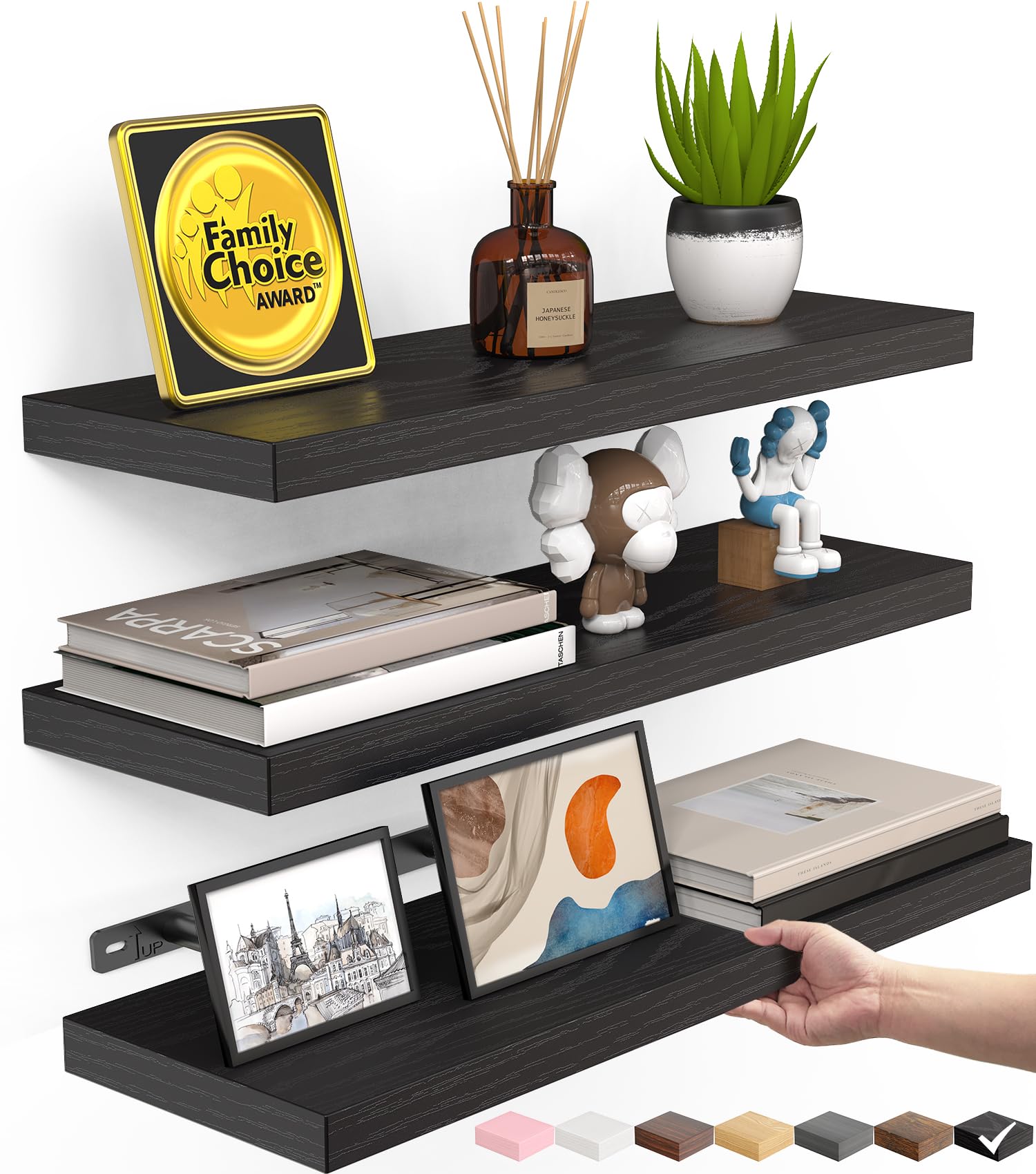
When your loft desk has limited surface space, these floating shelves give you a simple way to move small essentials off the desktop.
The set includes three 15.7-inch shelves, so you can place books, notebooks, plants, speakers, décor, or frequently used supplies within easy reach without adding another piece of furniture.
The matte black finish and rustic design suit study areas, bedrooms, offices, and gaming setups.
Use one shelf for daily supplies, another for display items, and the third for items you need only occasionally.
They can also help you prep your workspace for special projects, like organizing craft materials, presentation supplies, or extra lighting.
Each shelf is 6.7 inches deep and includes wooden boards, metal brackets, screws, and wall anchors.
If you want affordable vertical storage that keeps your loft desk looking less crowded, this set is a practical choice.
Check your wall type and mounting location first, especially if you plan to store heavier items.
What People Say
The product information didn’t include detailed review themes, but the main appeal is clear: three shelves, hidden brackets, and a compact footprint at a low price.
The black finish and flexible room use also make the set easy to match with a loft desk, bedroom, or home office.
Overall Sentiment: Positive

Ease Of Use
| Feature | Ease Level |
|---|---|
| Wall Mounting | Moderate |
| Shelf Assembly | Easy |
| Item Organization | Easy |
| Bracket Installation | Moderate |
Flexible Storage
Use these shelves for study supplies, books, small speakers, plants, collectibles, or everyday accessories.
They are useful in a loft bedroom, but their compact design also suits bathrooms, kitchens, laundry rooms, and home offices.
Simple Style
The matte black finish gives your wall a clean, understated look, while the rustic styling adds a little warmth.
Hidden brackets make the shelves look less bulky than traditional bracketed shelving.
Everyday Strength
The engineered wood boards are designed for everyday light-to-moderate storage, with a stated capacity of up to 22 pounds.
For best stability, install the shelves securely and distribute weight evenly, rather than placing one heavy item at the edge.
Easier Reach
By keeping books, chargers, and desk accessories within arm’s reach, the shelves can make your workspace easier to use.
You spend less time searching through desktop piles and more time working in a clear, organized space.
Vertical Storage
These shelves make strong use of vertical wall space, which is especially helpful when your loft desk is narrow.
With three separate surfaces, you can group supplies by purpose and keep your main work area open for a keyboard, notebook, or monitor.
Key Benefits
- Adds three storage surfaces without using valuable desk space
- Provides up to 22 pounds of stated storage capacity
- Uses hidden brackets for a cleaner wall-mounted appearance
- Fits books, décor, office supplies, plants, and small electronics
- Works in bedrooms, offices, study areas, kitchens, and living rooms
Current Price: $20.98
Rating: 4.4 out of 5 (total: 11,295+)
A compact loft desk needs a chair that fits comfortably without making the area feel even tighter.
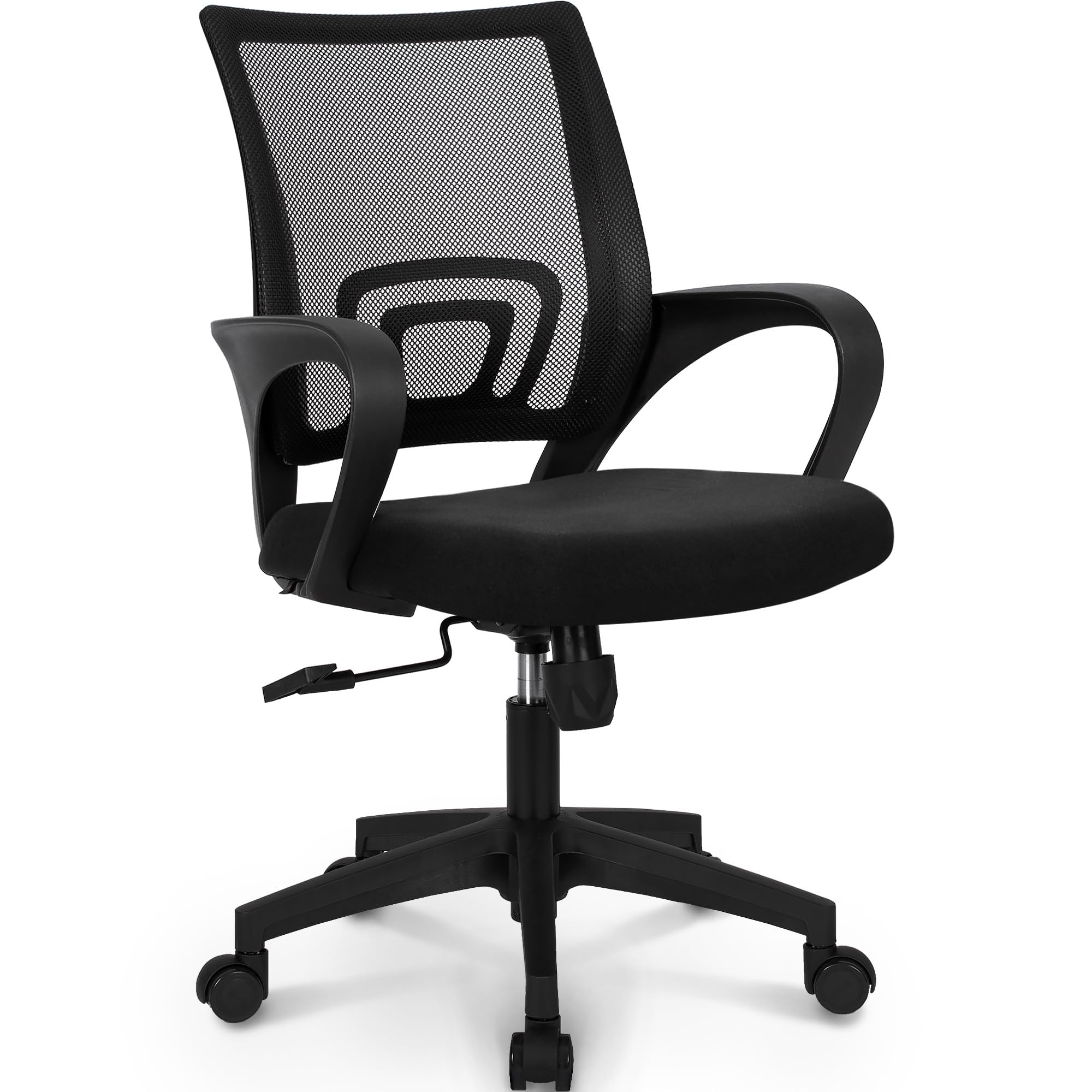
This NEO CHAIR gives you a straightforward setup with a breathable mesh back, lumbar support, adjustable height, fixed armrests, rolling casters, and a seat lock.
Use it for daily studying, computer work, reading, or casual gaming.
The mid-back design keeps the chair visually lighter than a large executive model, which can help your loft area feel more open.
The rolling base also makes it easier to move in and out from under the desk when you need to switch between sitting and standing tasks.
At $39.98, it is a sensible option if you need a basic chair quickly without spending heavily.
Think of it as a practical budget seat rather than a highly adjustable ergonomic chair.
If you want breathable support and simple height adjustment for everyday use, it is worth considering, provided the dimensions suit your body and desk height.
What People Say
Customers often praise the quick assembly, supportive cushion, breathable mesh, and useful height adjustment.
Many feel the chair offers good everyday value for the price and works well for study or home office use.
Some feedback points to occasional issues with wheel installation or durability, while larger users may find the seat less accommodating.
Overall Sentiment: Positive

Ease Of Use
| Feature | Ease Level |
|---|---|
| Assembly | Easy |
| Height Adjustment | Easy |
| Rolling Movement | Easy |
| Seat Lock | Moderate |
Flexible Use
You can use this chair for studying, computer work, reading, office tasks, or casual gaming.
Its simple design suits a bedroom loft, home office, classroom, or compact workstation, though it lacks the extensive adjustments found on premium ergonomic chairs.
Modern Look
The black color and modern shape blend easily with most loft desk setups.
Its mid-back profile keeps the chair from dominating a small room, while the mesh adds a practical office style.
Build Quality
The chair feels sturdy for its price and includes a one-year manufacturer’s warranty.
Customer feedback is mostly favorable, though some users have reported trouble keeping a wheel attached, so check the casters carefully during assembly.
Everyday Comfort
The mesh back promotes airflow, while the lumbar support and padded seat provide reasonable comfort for everyday sessions.
You can adjust the height to match your loft desk, but the fixed armrests and limited recline functionality may not suit you if you want extensive ergonomic customization.
Space Saving
This chair has no built-in storage, but its rolling base lets you slide it under the desk when you’re not using it.
That can help keep the floor area below your loft bed more open and easier to navigate.
Key Benefits
- Breathable mesh back helps improve airflow during longer sessions
- Lumbar support and height adjustment help you find a better working position
- Rolling casters make it easier to move around a compact loft workspace
- Fixed armrests provide basic upper body support
- Low price makes it an accessible option for a first desk chair
Current Price: $39.98
Rating: 4.2 out of 5 (total: 3,958+)
If your loft desk feels cramped because of a bulky monitor stand, this ErGear arm can give you back usable workspace.
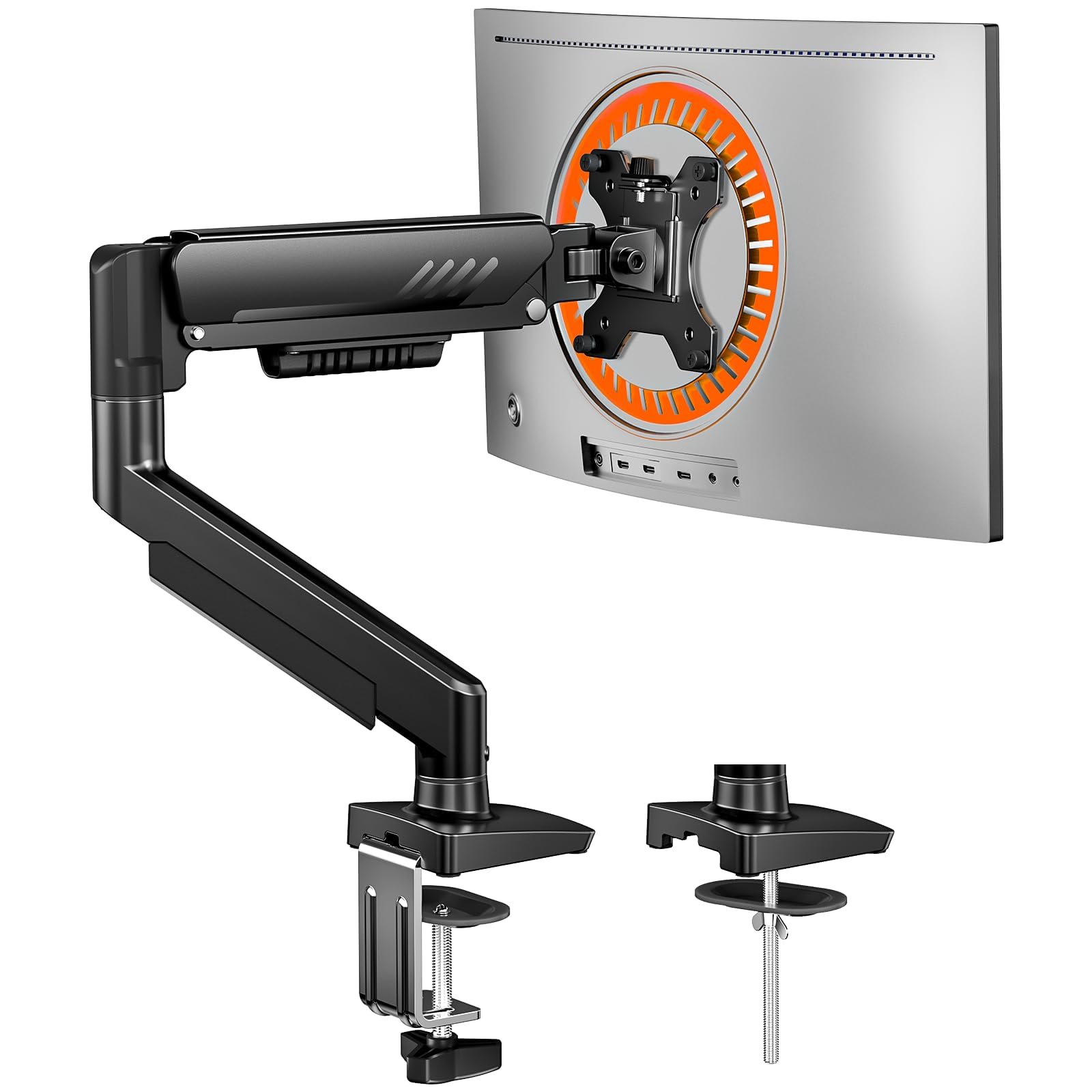
It supports one 13- to 34-inch monitor and lets you swivel, tilt, and adjust the height, making it easier to create a comfortable viewing angle for work, study, gaming, or creative tasks.
The tool-free VESA mount is handy when you need to attach or remove a compatible monitor without dealing with extra tools.
You can also move the display out of the way when you need room to write, organize materials, or work on a special project.
Built-in cable management helps keep the area around your loft desk looking less tangled.
With alloy steel construction, support for monitors up to 19.8 pounds, and a two-year warranty, this is a practical $26.99 upgrade.
It is a good fit if you use one screen and want more flexibility without the cost or footprint of a dual monitor mount. Before buying, check your monitor’s VESA pattern, weight, and size.
What People Say
Customers often praise the straightforward installation, sturdy build, and wide range of motion.
The tool-free VESA attachment and adjustable height are especially useful if you regularly change your screen position, and the cable management works better than some buyers expect.
Several people also appreciate the price, though you should secure the monitor carefully and make sure the mount fits your specific display.
Overall Sentiment: Positive

Ease Of Use
| Feature | Ease Level |
|---|---|
| Initial Assembly | Easy |
| VESA Attachment | Easy |
| Monitor Adjustment | Easy |
| Cable Routing | Moderate |
Flexible Use
You can use this arm for studying, office work, gaming, video calls, or creative projects.
It supports screens up to 34 inches, so you can upgrade your monitor later as long as it stays within the weight and VESA limits.
Cleaner Look
The black finish and raised monitor position give your desk a cleaner, more streamlined appearance.
By removing the original monitor stand from the work surface, the arm can make a small loft desk look less crowded.
Solid Build
The alloy steel construction feels substantial, and the arm supports up to 19.8 pounds.
A two-year warranty adds reassurance for regular use, but follow the mounting instructions and confirm every monitor connection is secure before adjusting the screen.
Better Positioning
Swivel, tilt, and height adjustment help you place the monitor at a more natural viewing angle.
That flexibility can reduce the need to bend your neck or shift your chair repeatedly during long study, work, and gaming sessions.
Desk Space
This arm doesn’t provide storage, but it replaces a bulky monitor base and frees up space for your keyboard, notebooks, speakers, or desk accessories.
That extra room is particularly valuable when your loft workstation has a narrow desktop.
Key Benefits
- Raises one monitor off the desktop to create more usable workspace
- Supports 13 to 34-inch screens weighing up to 19.8 pounds
- Offers swivel, tilt, and height adjustment for flexible positioning
- Includes a tool-free VESA mounting system
- Helps hide cables along the monitor arm
Current Price: $26.99
Rating: 4.4 out of 5 (total: 9,250+)
If noise from roommates, traffic, or a busy home makes it harder to focus at your loft desk, the Bose QuietComfort headphones give you a simple way to create a quieter listening space.
Active noise cancellation reduces surrounding sound, while Quiet and Aware modes let you block distractions or stay aware of what is happening around you.
Use them for studying, video calls, music, podcasts, gaming, or quiet reading.
The adjustable EQ lets you shape the sound in the Bose Music app, and multipoint connectivity makes it easier to switch between devices like your laptop and phone.
With up to 24 hours of battery life, they can handle a full day of work or travel without needing a recharge.
The over-ear design, detachable cable, protective case, and USB-C charging make them useful beyond your desk, including commutes, flights, and focused work sessions in shared spaces.
At $359.00, they are a premium purchase, but worth considering if reliable noise control and comfortable wireless listening are top priorities.
What People Say
The product information didn’t include detailed review themes, so there isn’t enough source material to identify specific customer patterns.
Based on the listed features, the main strengths are the adjustable noise control, long battery life, wireless and wired listening options, and compatibility with phones, tablets, and laptops.
Overall Sentiment: Positive

Ease Of Use
| Feature | Ease Level |
|---|---|
| Bluetooth Pairing | Easy |
| Noise Control Switching | Easy |
| Bose Music App Setup | Moderate |
| Multipoint Connections | Moderate |
Flexible Listening
Use these headphones for focused study, remote work, music, podcasts, travel, and video calls.
Quiet mode suits deep concentration, while Aware mode helps you hear announcements, conversations, or activity around you.
The included cable also gives you a wired listening option when Bluetooth is unavailable.
Modern Style
The Sandstone finish gives the headphones a softer, more understated appearance than plain black models.
Their over-ear shape has a familiar, modern look that works well at a desk or on the go.
Travel Ready
The headphones include a protective case and a detachable audio cable, making storage and transport easier.
They come with a one-year manufacturer’s warranty, but they aren’t water-resistant, so keep them away from moisture and harsh weather.
Focused Comfort
The over-ear design and adjustable headband suit extended listening sessions at your desk.
Noise cancellation can also make your workspace feel less tiring by blocking steady background noise, though comfort depends on your fit and personal preference.
Easy Storage
These headphones don’t add clutter to your loft desk, and the protective case keeps them organized when you are not using them.
Wireless listening also reduces the need to route an audio cable across your workspace, and the detachable cable packs separately when needed.
Key Benefits
- Reduces background noise with active noise cancellation
- Offers Quiet and Aware listening modes for different surroundings
- Provides up to 24 hours of battery life on one charge
- Lets you adjust sound through the Bose Music app
- Supports Bluetooth, multipoint connections, and optional wired listening
Current Price: $359.00
Rating: 4.5 out of 5 (total: 22,287+)
FAQ’s
How Can You Save Space On A Loft Desk?
Reclaim valuable surface area by using a monitor arm instead of the stands that come with your screens. A dual arm such as the HUANUO FlowLift can hold two compatible monitors above the desk, while floating shelves can move books and accessories onto the wall. If you use one monitor, a single arm such as the ErGear model may be enough.
What Should You Check Before Buying A Monitor Arm?
Check your monitor size, weight, and VESA mounting pattern before you order. The HUANUO supports 13 to 32-inch screens and up to 19.8 pounds per arm, while the ErGear supports 13 to 34-inch screens and up to 19.8 pounds.
Also confirm that your loft desk is sturdy enough for a clamp or mounted accessory and that the arm will not interfere with the bed frame above.
How Can You Make A Loft Desk More Comfortable?
Start by positioning your monitor close to eye level and far enough away that you don’t have to lean forward. A height-adjustable chair, such as the NEO CHAIR at $39.98, can help you match your seating position to the desk.
If noise makes it hard to focus, Bose QuietComfort headphones offer active noise cancellation, though their $359.00 price makes them a bigger investment. Keep cables secured, leave enough room to move your chair, and avoid placing heavy items where they could fall from the loft.
What Customers Prefer
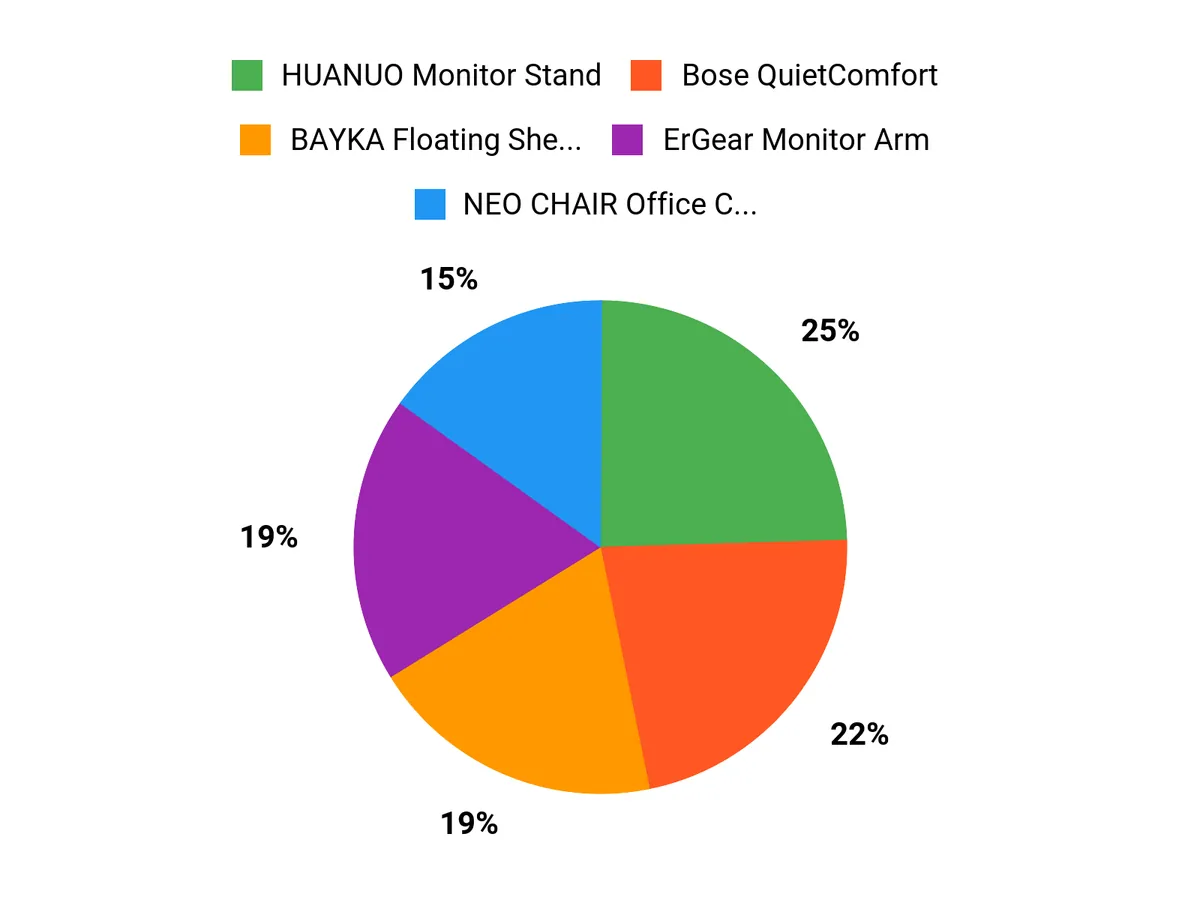
You typically prioritize space savings, easy setup, and practical value when choosing between these options.
The HUANUO Monitor Stand frees up space and lets you adjust your screens, BAYKA Floating Shelves add affordable vertical storage, and the NEO CHAIR focuses on everyday seating comfort without a high price.
Our Wrap Up
A well-planned loft desk should feel open, supportive, and easy to use.
The HUANUO and ErGear arms lift monitors off the desktop and position them at a more comfortable viewing height, while the BAYKA shelves add storage without taking up workspace.
The NEO CHAIR offers an affordable starting point for everyday seating, with mesh airflow, height adjustment, and lumbar support.
If noise is your main distraction, the Bose QuietComfort headphones provide active noise cancellation, adjustable sound, multipoint connectivity, and up to 24 hours of battery life.
Start with the upgrade that addresses your biggest limitation.
Add a monitor arm when desk space is tight, shelves when clutter is building, a supportive chair when long sessions are uncomfortable, or noise-canceling headphones when concentration is difficult.
Optimizing your loft bed desk setup involves a thoughtful blend of ergonomic principles, practical organization, and conscious lifestyle choices.
By implementing the strategies discussed in this article—from choosing the right desk design to investing in essential ergonomic accessories—you can create a workspace that improves comfort and boosts productivity.
Remember, small changes can lead to significant improvements.
As you explore unique loft bed desk arrangements, prioritize comfort and efficiency to create an environment that supports creativity and productivity.
Embrace your new workspace, and take the first steps toward enhanced well-being and effectiveness today!
| Product Name | Image | Rating | Primary Loft-Desk Benefit | Key Specifications | Installation And Setup | Best Use And Limitations | Price |
|---|---|---|---|---|---|---|---|
| HUANUO FlowLift™ Dual Monitor Stand |
 |
4.6/5 (34,854 reviews) |
|
|
|
|
$57.99 |
| BAYKA Black Floating Shelves, Set Of 3 |
 |
4.4/5 (review count not provided) |
|
|
|
|
$20.98 |
| NEO CHAIR Office Computer Chair Gaming Mid-Back Mesh Desk Chair |
 |
4.2/5 (3,958 reviews) |
|
|
|
|
$39.98 |
| ErGear Single Monitor Arm |
 |
4.4/5 (9,250 reviews) |
|
|
|
|
$26.99 |
| Bose QuietComfort Wireless Headphones |
 |
4.5/5 (22,287 reviews) |
|
|
|
|
$359.00 |
Action Steps
Resources
This review is reader-supported. When you click through links, we may earn a referral commission on qualifying purchases.





2 Comments